

A tenant gives notice. The property management system (PMS) records the lease change, but the website may continue to show the unit as unavailable until its next update. Maintenance may receive the turnover request by email, while finance adjusts the ledger during month-end reconciliation. These gaps can reflect missing connections, delayed synchronization, or differences in how systems process and interpret updates.
In many property companies, operational data sits across a PMS, accounting software, a CRM, maintenance tools, spreadsheets, and, in larger portfolios, building systems. Property management software integration connects these environments so relevant records and updates can move between them. How quickly and reliably they do so depends on the interfaces available, synchronization schedules, error handling, and the needs of each business process.
This article covers the systems in a typical property management stack, how disconnection shows up in daily work, how integration is planned, and where to start.
What Systems Make Up a Property Management Technology Stack?
Most stacks grow in layers. Accounting may predate the PMS, while leasing, maintenance, or building tools get added as teams need them. Each arrives with its own data model.
| System | What it holds | Where integration can fail |
| Property management system (PMS) | Leases, units, occupancy, tenant records | Lease changes don’t reach other systems |
| Accounting and ERP | Charges, payments, budgets, property costs | Transactions don’t link to the correct lease or property |
| CRM | Prospects, contacts, tenant interactions | A converted prospect creates a duplicate record |
| Leasing platforms and tenant portals | Applications, availability, service requests | Requests remain disconnected from unit records |
| Maintenance and work-order systems | Repairs, contractors, work orders | Work-order costs reach finance late |
| Property websites and listing platforms | Published rents, property details, availability | Listings don’t reflect current availability |
| Spreadsheets and reporting tools | Imported records, calculations, reports | Manual updates create competing versions |
| Utility and energy systems | Meter readings, consumption data | Readings aren’t associated with the right building |
| IoT and building management systems (BMS) | Equipment status, alerts, access events | Alerts don’t reach the maintenance workflow |
| External property and market data | Comparable rents, neighborhood characteristics | External records aren’t linked to portfolio properties |
The relevant systems vary by portfolio and operating model. Integration planning should start with the workflows and data each business needs to connect, rather than assuming every company uses the same stack.
Property Management Systems
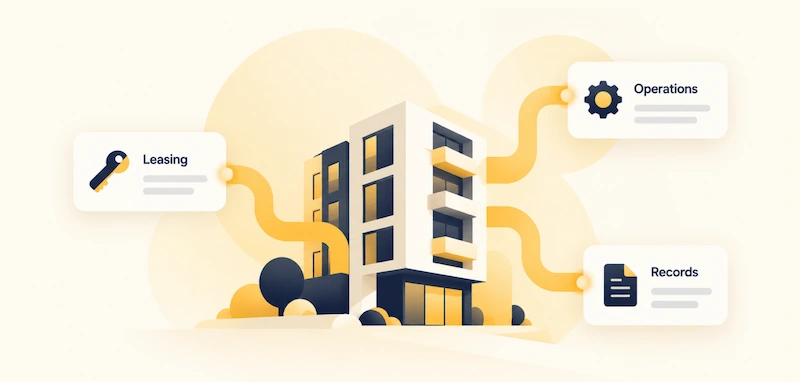
The PMS is often a central participant in property operations, but it is not necessarily the authoritative source for every field. Integration requirements depend on which records the PMS manages, which interfaces it exposes, and what other applications need from it. If its capabilities cannot support a required connection, the company can assess whether to extend the platform or consider custom property management software.
Building Systems and External Data
Some portfolios also connect building management systems that supply meter readings, equipment status, or access events. External sources, such as comparable rents, may also feed property analysis. In both cases, the integration must map incoming records to the correct building or property and account for the source’s identifiers, format, and update frequency.
What Breaks When Property Management Systems Are Disconnected
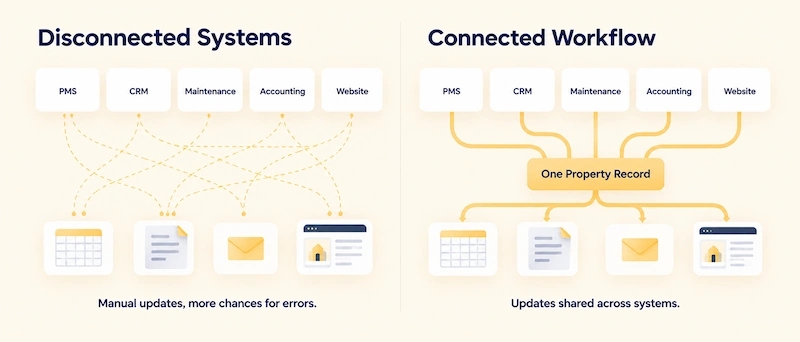
Data Does Not Propagate Consistently Between Systems
A lease change recorded in the PMS may not appear in a listing platform until its next scheduled refresh. A maintenance status may also remain outdated in a reporting export if the latest work-order update has not been transferred. These gaps depend on the integration method, synchronization frequency, and how failed or delayed updates are handled.
Reports Reflect Different Data Refreshes
A portfolio report may combine a rent roll exported in the morning with accounting data refreshed overnight. Even when both sources are accurate, their different refresh times can produce temporary discrepancies. Integration design should define which data each report uses, how frequently it is updated, and how users can identify stale or incomplete results.
The Same Occupancy Metric Means Different Things
Consider a unit with a lease starting on the first of the month and a tenant moving in on the third. The PMS may classify the unit as occupied from the lease start date, while leasing may count it only after move-in. Finance may use a posted rent charge as its criterion.
| System | Illustrative status | Counts as occupied? |
| PMS | Lease active | Yes |
| Leasing report | Move-in pending | No |
| Finance report | Rent charge posted | Yes |
The integration should preserve the meaning of each source status rather than assume that every system defines occupancy identically. Document the criteria used in reporting and make differences traceable. For a deeper explanation of conflicting property records and reconciliation, see reconciling inconsistent real estate data.
What Fragmentation Costs a Property Business
- Staff time. Repeated checking and re-entry reduce the time available for property operations and tenant requests.
- Tenant service. Staff may give inconsistent answers about a repair or payment if they rely on different system views.
- Financial visibility. Managers may struggle to trace differences in occupancy, rent, or maintenance costs across reports. Those discrepancies limit oversight but do not, by themselves, prove that money has been lost.
How Integration Moves Data Between Systems
A property management integration defines how a change in one application becomes available to another. For example, when a lease status changes in the PMS, the integration may transfer the relevant fields to a listing platform or reporting database. The receiving system can then update its own record according to its rules.
The implementation must specify which fields are transferred, how records are matched, when updates run, and what happens when a destination system is unavailable or rejects a change. Depending on the interfaces involved, the transfer may use an API call, a scheduled feed, or an event-triggered message.
Connecting the systems establishes a data exchange path. Any additional actions, approvals, or automated operational steps depend on workflow rules implemented separately.
How to Plan Property Management Software Integration
The four steps below apply to one workflow at a time. Repeat them for each additional integration.
1.Map the Workflow and Data Sources
Start with one process that crosses systems, such as recording a lease, collecting rent, or closing a maintenance request. Identify the applications involved, the data exchanged, the interfaces available, and the team responsible for each part of the workflow.
An application inventory shows which systems exist, but tracing one transaction reveals where data is created, transformed, delayed, or lost. Document the required update frequency and the consequences of a failed transfer for each step.
In some companies, IT maintains the applications without owning the data flows between them. Assigning responsibility for the integration workflow is therefore part of project planning. A data source and architecture assessment can help identify relevant systems, interfaces, and dependencies.
2.Match Records and Define Ownership
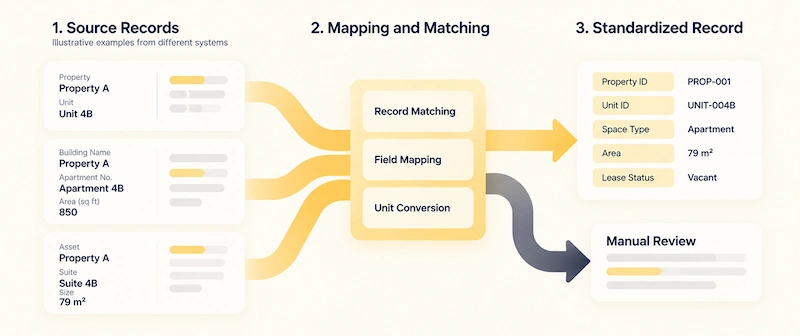
Before transferring data, define how the integration identifies the same property, unit, tenant, or lease across systems. Three sets of rules are needed:
- Record matching: Use stable identifiers where available. Define how to handle missing identifiers and ambiguous matches, including when manual review is required.
- Field ownership: Specify which system is authoritative for each field or event. For example, the PMS may own current lease status, while accounting owns posted payments. No single application necessarily owns the entire record.
- Field mapping and conflict resolution: Map source fields to the structure expected by the receiving system, standardizing terminology, formats, and units where needed. Define how to handle conflicting values and delayed updates. Normalization makes data more consistent, but does not prove that two records represent the same entity.
For a deeper explanation of identifier matching, normalization, and source priority, see reconciling inconsistent real estate data.
3.Connect the Systems and Automate Updates
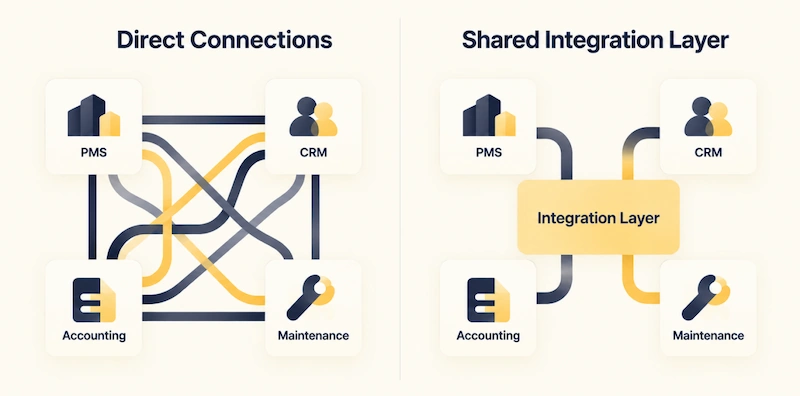
Integration can use several mechanisms, depending on the source systems and the workflow. An integration layer may include API-based exchange, scheduled data pipelines, event-driven messaging, file transfers, and transformation logic. These mechanisms can work together rather than serving as mutually exclusive alternatives.
Integration Methods and Patterns
| Method or pattern | How it works | Fits when | Watch for |
| API-based exchange | Systems use documented interfaces to request or send records | Applications expose suitable APIs, and updates must move on demand or during the day | Rate limits, version changes, authentication, and partial failures |
| Scheduled batch feed | Records are exported and loaded at defined intervals | Daily or monthly reporting and other workflows can tolerate delayed updates | Data freshness depends on the schedule and successful completion of each run |
| Event-driven messaging | An event or webhook initiates a workflow; data may then move through an API or message broker | A business event needs to trigger a timely downstream action | Delivery guarantees, retries, duplicate events, ordering, and monitoring |
| File exchange | Files are transferred through an agreed location or process | A source system lacks a suitable API or already supports structured exports | Schema changes, incomplete files, duplicate processing, and manual fallback |
The appropriate pattern depends on what each source system supports and how fresh the data needs to be. API calls may be triggered by events, while scheduled feeds may coexist with event-driven workflows. No single method guarantees successful delivery without monitoring and error handling.
4.Validate the Data and Handle Exceptions
A successful transfer does not guarantee correct data. Validate record matching, required fields, destination updates, and reconciled totals where the underlying business definitions align.
After launch, monitor failed transfers, unresolved exceptions, duplicate processing, and delays against the freshness requirements of each workflow. Assign responsibility for investigation and correction, and test how the process behaves when a source system is unavailable or an update must be retried.
Common Integration Risks
- Point-to-point dependencies. Direct connections can become costly to maintain when APIs, field mappings, or business rules change. A shared integration layer can centralize selected logic and monitoring, but it also needs ongoing maintenance.
- Inconsistent access controls. Systems may use different roles and authorization rules. Map permissions deliberately and enforce them wherever data is transferred, stored, or exposed to downstream applications.
- Unmanaged failures. Failed transfers can leave records out of sync. Define how failures are detected, retried, logged, and reconciled, including how staff should handle changes made during an outage.
How to Evaluate an Integration
Set a baseline before implementation and measure the same workflow after launch.
| Workflow | Baseline | Compare after launch |
| Reporting | Hours to prepare; records corrected by hand | Same measures, plus delay between source updates and report availability |
| Maintenance | Time from request to work order | Same measure, plus failed updates and duplicate creation |
Compare the same measures before and after launch, including the time required to prepare reports, the number of manually corrected records, update delays, and failed transfers. A reporting view can help teams track these measures over time, provided its definitions and source data are consistent.
How Integration Supports AI Applications
Integration can make information from leasing, finance, maintenance, and property operations available to AI applications through connected systems or a shared data layer. This can support questions such as which units became vacant this week, which are awaiting maintenance, or how current rents compare with nearby market data.
Reliable answers require more than connected systems. Records must be matched correctly, values must meet the required freshness standards, and access permissions must be enforced. Depending on the application, the architecture may also need a semantic layer, search index, source references, and mechanisms to validate answers against underlying records.
Integration is therefore a foundation for AI, not a complete AI architecture. It helps make data accessible and consistent, while retrieval, permission enforcement, source attribution, and answer validation determine how that data can be used safely and reliably.
Establish a Stronger Data Foundation for Property Operations
Property management software integration requires more than establishing connections between a PMS, accounting, CRM, and maintenance systems. The implementation must define how records are matched, which system owns each field, how updates are synchronized, and what happens when transfers fail.
The right architecture depends on the workflow. Availability data may need frequent updates, while financial reporting may work with scheduled batches. Defining these requirements early helps property companies connect existing platforms and plan future software development without assuming that every system needs the same integration pattern.


