
A production release is not the end of engineering work on a product. It is the point where the software starts living in an environment it doesn’t control. Operating systems ship new versions, dependencies get patched or deprecated, third-party APIs change their contracts, traffic grows, and newly disclosed vulnerabilities turn yesterday’s safe code into today’s exposure.
App maintenance is the ongoing engineering discipline that keeps a live application secure, compatible, performant, and reliable as that environment shifts underneath it. It is a continuous practice with its own planning, testing, and release cadence.
This guide covers what app maintenance includes, the four established types of software maintenance, why applications need continuous updates, how often to ship them, and how to release changes without destabilizing a product already in production. At ORIL, this is part of how we think about a software product across its full lifecycle, not just at launch.
What Is App Maintenance?
App maintenance is the recurrent engineering work performed on a software product after release to keep it secure, compatible, reliable, and performant. It spans four established categories of work: corrective, adaptive, perfective, and preventive. The same discipline applies whether the product is a mobile app, a web application, or the backend services behind them.
One line is worth drawing clearly. Maintenance keeps an existing system healthy as its environment changes; new development adds capability the product didn’t have before. The two usually share a backlog and a release pipeline, but they answer different goals.
| Maintenance | New development |
| Keeps a live system healthy as its environment shifts | Adds capability the product didn’t have before |
| Triggered by a defect, a platform change, or accumulating risk | Triggered by a product or roadmap decision |
Maintenance is also a considerable budget line. The U.S. National Institute of Standards and Technology (NIST) estimates that software maintenance represents 60% to 70% of total software costs over the software lifecycle.
The actual figure varies with a product’s complexity, lifespan, and maintenance needs, but the underlying point is consistent: post-launch engineering is a substantial, recurring cost. Planning for application maintenance costs as a predictable budget line tends to be more realistic than treating maintenance as an unexpected expense.
What Does Application Maintenance Include?
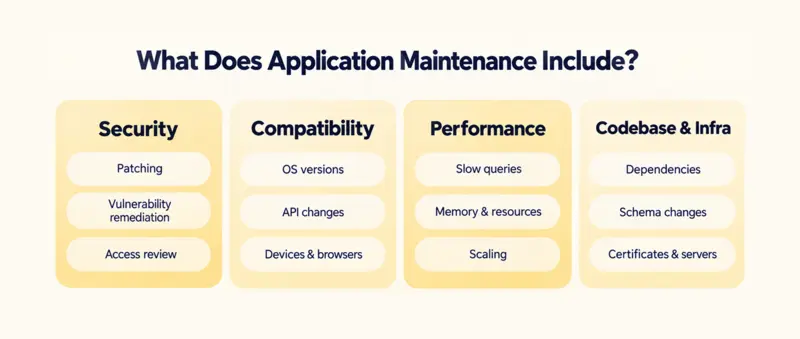
Maintenance covers a broader set of activities than fixing reported bugs. In practice, an ongoing maintenance scope usually includes:
- Security patching and vulnerability remediation, including updates to the application and its underlying platform.
- Dependency and library updates, keeping third-party packages current and replacing deprecated ones.
- Compatibility work across new operating system versions, browsers, and devices.
- API and integration maintenance as third-party services change their contracts or retire endpoints.
- Performance optimization, including slow database queries, memory usage, and resource limits.
- Database and infrastructure maintenance: schema changes, certificate renewals, server and runtime upgrades.
- Monitoring, logging, and alerting so issues surface before users report them.
- Testing and release management for every change that ships.
- Interface and usability refreshes, including a periodic UX design audit as design standards and OS conventions shift.
Bug fixing sits inside this list, but it is one activity among several. Most of the work is keeping the software current with an environment that keeps moving.
The 4 Types of Software Maintenance
Software maintenance is conventionally grouped into four types, a categorization codified in software engineering standards ( ISO/IEC 14764). Each type answers a different trigger.
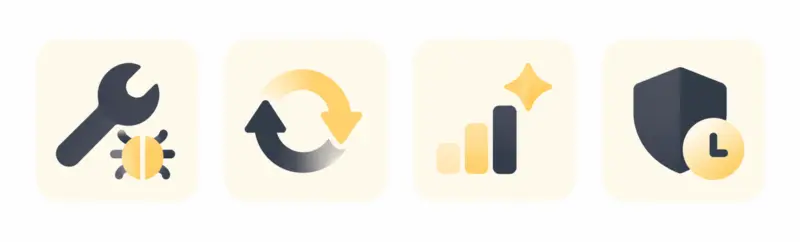
| Type | Purpose | Example | Typical trigger |
| Corrective | Fix defects and incidents in live software | Patch a crash caused by an unhandled edge case | Bug report, error spike, production incident |
| Adaptive | Keep software working as its environment changes | Update code for a new OS version or a changed API contract | New OS/SDK release, third-party API change, new regulation |
| Perfective | Improve usability, performance, and features | Refactor a slow screen, refine a workflow users struggle with | User feedback, performance data, product goals |
| Preventive | Reduce future risk and technical debt | Refactor fragile code, update dependencies, add test coverage | Aging code, accumulating debt, anticipated scale |
Preventive work is the type most easily deferred, because its payoff is a problem that never happens. It includes structured database migration practices that update schemas without corrupting live historical data, dependency upgrades, and targeted refactoring that keeps a codebase changeable.
Why Do Apps Need Continuous Updates?
Applications may fall out of step with an environment that changes constantly around them. Each change creates a specific risk if the software stays still.
- Operating systems and browsers ship new versions. Behavior that worked on the previous version can break, and some platforms drop support for older APIs.
- Dependencies get patched or deprecated. A library that stops receiving updates becomes both a security liability and a blocker for other upgrades.
- Third-party APIs change. Endpoints get versioned or retired, and integrations that aren’t tracked can fail silently, often where data flows between systems.
- Vulnerabilities are disclosed continuously. Code considered safe at release can become exploitable once a new weakness in it or its dependencies becomes public.
A real estate application inherits every system it connects to. Listing platforms may depend on MLS feeds, RESO-based APIs, property data providers, payment systems, CRM and PMS integrations, valuation services, or internal data pipelines. Maintaining the application therefore also means maintaining the contracts and data flows between those systems, not just the application’s own code.
This is where domain-specific maintenance differs from generic upkeep. Knowing that a RESO field change affects listing sync, or that a PMS integration touches lease and occupancy workflows, comes from working in these systems directly. ORIL’s PropTech engineering work spans brokerage and listings, property management, and real estate data platforms, where this kind of upstream change is a routine part of keeping a product running.
In real estate software, that dependency shows up in specific places:
| Real estate system | What can change upstream | Maintenance impact |
| MLS / RESO | API or data contract changes | Listing ingestion and synchronization can break |
| Property management (PMS) | Changes to PMS integrations | Rent, occupancy, lease, or maintenance workflows can be affected |
| Property data providers | Changes at the upstream provider | Field availability, identifiers, or update frequency can shift |
| Real estate analytics | Growing datasets | Database and query-performance issues surface that weren’t visible at launch |
| Payments | Payment provider API changes | Transaction flows can be affected and require compatibility testing |
Underneath most of these is code health. Maintaining long-term code stability means updating the underlying language runtime, frameworks, and server dependencies before old versions stop receiving security fixes. A deferred runtime upgrade tends to get harder and riskier the longer it waits, because more code accumulates against the old version.
5 Key Benefits of Continuous App Maintenance
Continuous maintenance produces five outcomes that compound over a product’s life.
-
Security and risk reduction.
Regular patching closes known vulnerabilities in the application and its dependencies, narrowing the window in which they can be exploited.
The outcome: fewer incidents, less exposure of user data, and lower odds of the reputational and regulatory costs that follow a breach.
-
Performance and reliability
Ongoing tuning keeps response times and resource usage in check as data and traffic grow: indexing slow queries, managing memory, and adjusting infrastructure ahead of demand.
For one real-time bidding backend, we applied high-performance app optimization with an in-memory data grid, moving the database write out of the blocking bid path so the system could process far more requests per second under peak concurrent load. Reliable performance keeps users active and reduces churn tied to a sluggish product.
-
Compatibility and integration stability.
Adaptive maintenance keeps a product working across new OS versions, devices, and evolving third-party APIs.
The outcome: fewer support tickets, fewer users locked out after a platform update, and integrations that keep moving data correctly.
-
Product and UX improvement.
Perfective maintenance turns usage data and feedback into refinements: clearer workflows, updated interfaces, and small features that raise adoption.
The outcome: retention and expansion revenue driven by a product that keeps pace with how people actually use it.
-
Lower technical debt and longer product lifespan.
Preventive work (refactoring, dependency upgrades, test coverage) keeps a codebase changeable, so each new change stays affordable. Reducing debt also depends on continuous product updates that refactor aging database schemas before data problems compound.
The outcome: a longer useful life for the product and a slower rise in the cost of every future change.
How Often Should You Update an App?
There is no universal update schedule that fits every application. The right cadence depends on a product’s risk profile rather than the calendar. A useful way to plan it is to separate updates by type and urgency rather than aiming for a single fixed interval.
| Update type | Typical cadence | What drives timing |
| Critical security patch | As soon as validated, often out of band | Severity of the vulnerability, whether it is being actively exploited |
| Dependency and platform updates | Rolling, tracked against upstream releases | Upstream schedules, deprecation deadlines, OS/SDK cycles |
| Routine maintenance (minor fixes, small optimizations) | Regular cycle, e.g., per sprint or release train | The team’s release cadence and backlog |
| Planned product improvements | Roadmap-driven | Product priorities and available capacity |
Factors that raise the required frequency include a large integration surface, sensitive data and compliance obligations, high traffic, and a product that is business-critical for its users.
A low-traffic internal tool with few dependencies can safely move more slowly. The aim is to match update frequency to exposure, then hold a predictable cadence for everything that isn’t an emergency.
[Visual brief:
Purpose: the table lists four update types and their timing precisely. What a table can’t easily show is the continuum from immediate to roadmap-paced. A simple horizontal gradient bar communicates the “match frequency to exposure” idea spatially, which the table states but doesn’t depict. Mild duplication flag + resolution: to keep it from repeating the table’s four rows, make the visual a gradient spectrum, not four labeled boxes. It shows the shape of the idea (urgency high → low), while the table supplies the specifics. A single horizontal bar with a smooth left-to-right gradient, deep warm amber on the left fading to pale soft yellow on the right. Above or below the bar, four small flat marker dots or pins sit along it at intervals, left-weighted, each a tiny simple glyph: a shield/alert pin near the far left (most urgent), a refresh glyph next, a small gear/cycle glyph, and a roadmap flag near the right. Under the whole bar, two soft directional cues at the ends only (a small “urgent” upward tick left, a calm dot right) with no words. Rounded ends on the bar, soft shadow, flat and minimalist. The gradient itself carries the meaning: exposure drives urgency.]
How to Maintain App Quality During Continuous Updates
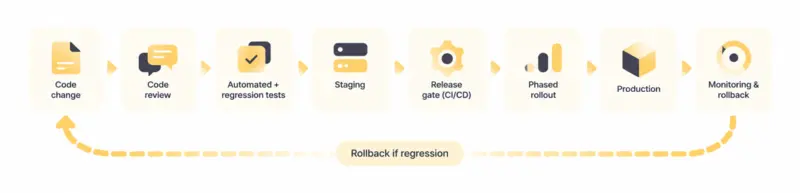
Frequent updates stay safe when the release process catches regressions before users do. The practices that make continuous updates low-risk are the same ones that make any change safe to ship.
- Automated tests, including regression tests, run on every change so existing behavior is verified before release.
- A staging environment that mirrors production surfaces integration and data issues before they reach users.
- CI/CD (continuous integration and continuous delivery) pipelines with release gates enforce checks automatically, providing the software quality control needed to ship routine patches without manual guesswork.
- Code review keeps changes readable and catches issues static checks miss.
- Phased or staged rollouts (releasing to a subset of users first) limit the blast radius of a bad change where the platform supports it.
- Monitoring and a tested rollback path mean a regression that slips through can be detected and reverted quickly.
- Post-release validation confirms the change behaves as expected in production, not only in testing.
Smaller, well-tested releases can reduce the risk associated with each change compared with infrequent releases that bundle many changes together.
App Maintenance for Security, Performance, and Compatibility
Three technical concerns depend most directly on ongoing maintenance. They tend to be where deferred work turns into visible failure.
Security
Security maintenance covers patching disclosed vulnerabilities, keeping dependencies current, and reviewing access controls as the system changes. Building a regular application security audit into the update cycle helps catch exposure introduced by new code or a newly disclosed weakness in an existing dependency. The work is continuous because new vulnerabilities are disclosed continuously.
Performance
Performance maintenance addresses latency, database query efficiency, memory and resource usage, and scalability. Query patterns that were fine at launch can degrade as tables grow, and infrastructure that fit early traffic can become a bottleneck. Catching this through monitoring, before users feel it, is usually far cheaper than responding to an outage.
Compatibility
Compatibility maintenance keeps a product working across operating systems, browsers, devices, SDKs, and third-party services. Proactive software maintenance practices keep third-party API changes from quietly breaking integrations and internal tools. Where platforms provide preview or beta releases, testing against them ahead of general availability gives teams time to identify compatibility issues.
When Is App Maintenance No Longer Enough?
Maintenance keeps a sound system healthy, but it cannot fix a foundation that has stopped supporting the product’s needs. A few signs indicate that routine maintenance is reaching its limit:
- The technology or a core dependency is unsupported, with no security updates available.
- Technical debt has accumulated to the point where small changes take disproportionate effort.
- The architecture is fragile, so a change in one area regularly breaks another.
- The same incidents keep recurring despite fixes.
- The system cannot scale to current or projected load without heavy rework.
- Routine changes have become expensive and slow.
- Observability is poor, so problems are hard to diagnose.
When several of these hold at once, continued maintenance often costs more than it returns, and revamping legacy applications or a targeted modernization becomes the more economical path.
Modernization addresses the underlying architecture, technology, or structure. Maintenance keeps an existing structure current.
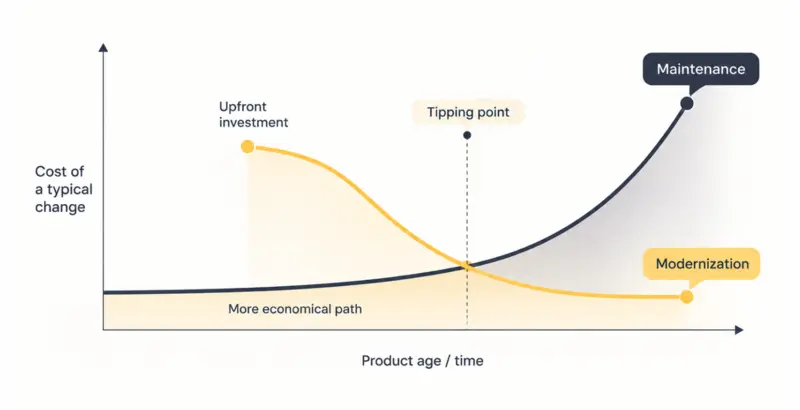
This is also where total cost of ownership matters. Factoring in post-launch app support over a product’s full life gives a truer comparison between continuing to maintain a system and rebuilding part of it. The decision is an engineering and financial one together.
How Businesses Can Manage Ongoing Application Maintenance
Maintenance is a capability to organize. Choose among three models, which many companies combine.
- In-house team. The product is maintained alongside new development. This keeps context in-house but competes for the same engineering capacity that ships features.
- Dedicated engineering team. A team, internal or contracted, owns maintenance as its focus. Companies often deploy dedicated engineering teams so continuous updates and maintenance sprints don’t pull feature developers off the roadmap.
- External development partner. A partner handles maintenance, modernization, or both, usually with a defined scope and response commitments.
Whichever model fits, a few practices make maintenance predictable:
- A proactive backlog for dependency updates, refactoring, and known risks, prioritized rather than reactive.
- Clear ownership, so maintenance has an accountable owner rather than being everyone’s spare-time work.
- Monitoring and a release calendar that separate scheduled updates from emergency patches.
- Regular security and dependency reviews.
- Documentation that keeps the system understandable as staff change.
- An incident process and, where relevant, SLA (service-level agreement) commitments for response and resolution.
When evaluating an external partner, their long-term application maintenance strategy matters as much as their build capability: how they handle security patching, dependency management, and post-launch support over years, not only the initial delivery.
Key Takeaways: App Maintenance Is an Ongoing Product Lifecycle Process
- App maintenance is continuous engineering work that keeps a live product secure, compatible, reliable, and performant as its environment changes.
- The four established types (corrective, adaptive, perfective, preventive) each respond to a different trigger, whether an incident, a platform change, or accumulating debt.
- Update frequency should be risk-based. Critical security patches ship immediately, while routine work follows a predictable cadence tied to the product’s exposure.
- Security, performance, and compatibility degrade quietly without ongoing attention, and tend to be cheaper to maintain than to repair after failure.
- Frequent updates stay safe through testing, staging, CI/CD, monitoring, and a tested rollback path, which make small releases lower-risk than rare large ones.
- Maintenance has limits. When debt, fragility, or unsupported technology make routine changes expensive, modernization becomes the more economical path.
- Treating maintenance as a planned capability, with clear ownership and a proactive backlog, keeps the cost of every future change lower.
Maintenance Is What Keeps a Product Worth Owning
The products that stay reliable for years are rarely the ones that were built best at launch. They’re the ones that kept receiving engineering attention afterward: patched before a vulnerability was exploited, upgraded before a dependency went unsupported, tuned before slow queries became an outage.
Maintenance is where a product’s real lifespan is decided, long after the release everyone celebrated.
ORIL supports products across that full lifecycle: technical assessment, security work, performance tuning, QA, integrations, and modernization when maintenance alone stops being enough.
Our platform enhancement case study shows continuous maintenance and infrastructure updates on a live IoT platform, and we provide ongoing engineering support for analytics data platforms where architecture has to stay scalable, secure, and compliant as it grows.


